
MediaTemple SSH cheapos!
I noticed that when I'm using SSH shell console on MediaTemple they're constantly timing me out. But on Hostgator, I've never had them time me out. What's up, MediaTemple? Why so cheap?Labels: hostgator, mediatemple, webhosting
Posted at 5:34 PM | 1 comments read on
Gmail (Google Apps) on MediaTemple - Instructions
Well the first thing you need to realize is that your MX records and CNAME must be changed where your domain name is hosted, not where it's registered. If you try to change the records at your registrar, you will either be told that the domain is not hosted there (GoDaddy), or you won't be told any useful information (Yahoo) and edit the records but see no effect.So if you're on to this post you are probably already aware that you need to change your records in MediaTemple. MediaTemple itself has no instructions specifically for configuring your DNS settings to use Google Apps for organizations, including Gmail for organizations. There is a good tutorial here, but it doesn't cover CNAME. Google itself has instructions for every service except MediaTemple, it seems.
So basically the instructions are:
- go to the management page for the domain you're concerned with
- find DNS ZONE and click to edit it
- delete any existing MX records
- type in new records as you see them below:
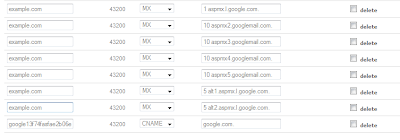
The values if you can't see them well in the picture are:
1 aspmx.l.google.com.
5 alt1.aspmx.l.google.com.
5 alt2.aspmx.l.google.com.
10 aspmx2.googlemail.com.
10 aspmx3.googlemail.com.
10 aspmx4.googlemail.com.
10 aspmx5.googlemail.com.
That's right. The priority number followed by space and then the server address followed by a period. The fields on the left should all simply say the name of your domain name: example.com, for example.
You can enter the CNAME address at the same time if you want to use this validation method for using Google apps. In the field on the left, enter the text that google gives you appended with your domain name. It will look something like google1kjs90102.yourdomainname.com
In the field on the right simply enter google.com
Give it a day for the DNS changes to propagate and then test it by logging into your Google apps account. If it failed to validate using the CNAME, it will say so. If it failed to find your MX records or needs more time, it will say so.
Otherwise everything is well and you can start sending and receiving email!
Labels: gmail, mediatemple
Posted at 4:55 PM | 6 comments read on
Keep getting logged out of BANS or PHP applications?
Do you keep getting logged out of your BANS (Build a Niche Store) website, your Frog CMS web site, Joomla or other PHP programs? Maybe it logs you out every few minutes or so or just randomly. Or it's not saving your session when you switch from HTTP to HTTPS. Or your sessions are just behaving inconsistently. In any case, you have a problem with your PHP sessions.Chances are that your web site needs to write data to the /tmp directory and something is interfering with it. You'll need to edit your php.ini file and set session.save_path
In Media Temple (is it MediaTemple?), that crappy web host, the solution is to go to your php.ini file and uncomment the line in there that starts with session.save_path
It'll look something like this
session.save_path = /home/19810/data/tmp
The numbers will be different though.
That should take care of your problem and allow you to use your BANS, Frog, Joomla and other PHP web applications with no session problems.
Labels: bans, frog, joomla, mediatemple
Posted at 2:20 PM | 0 comments read on